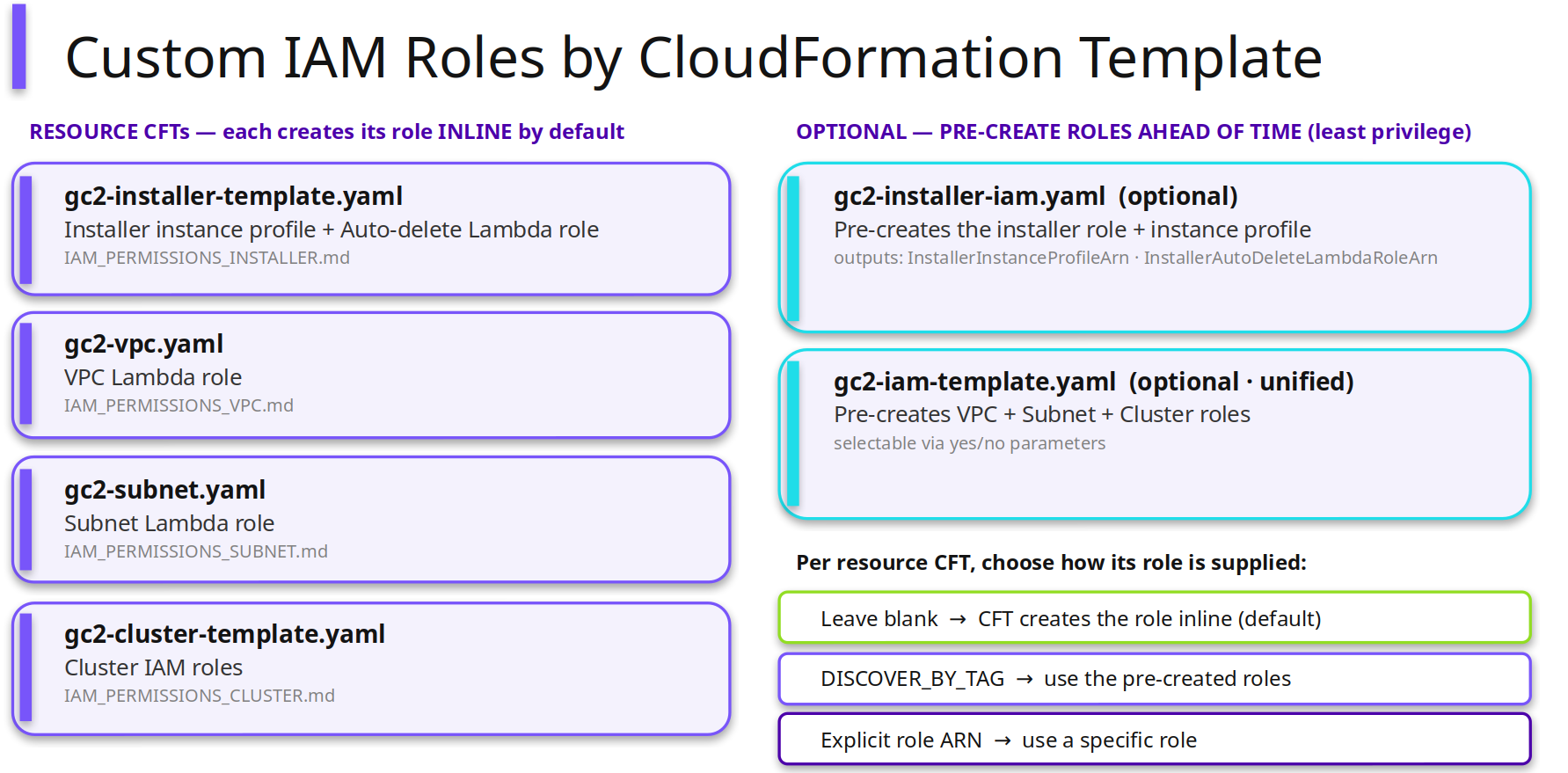
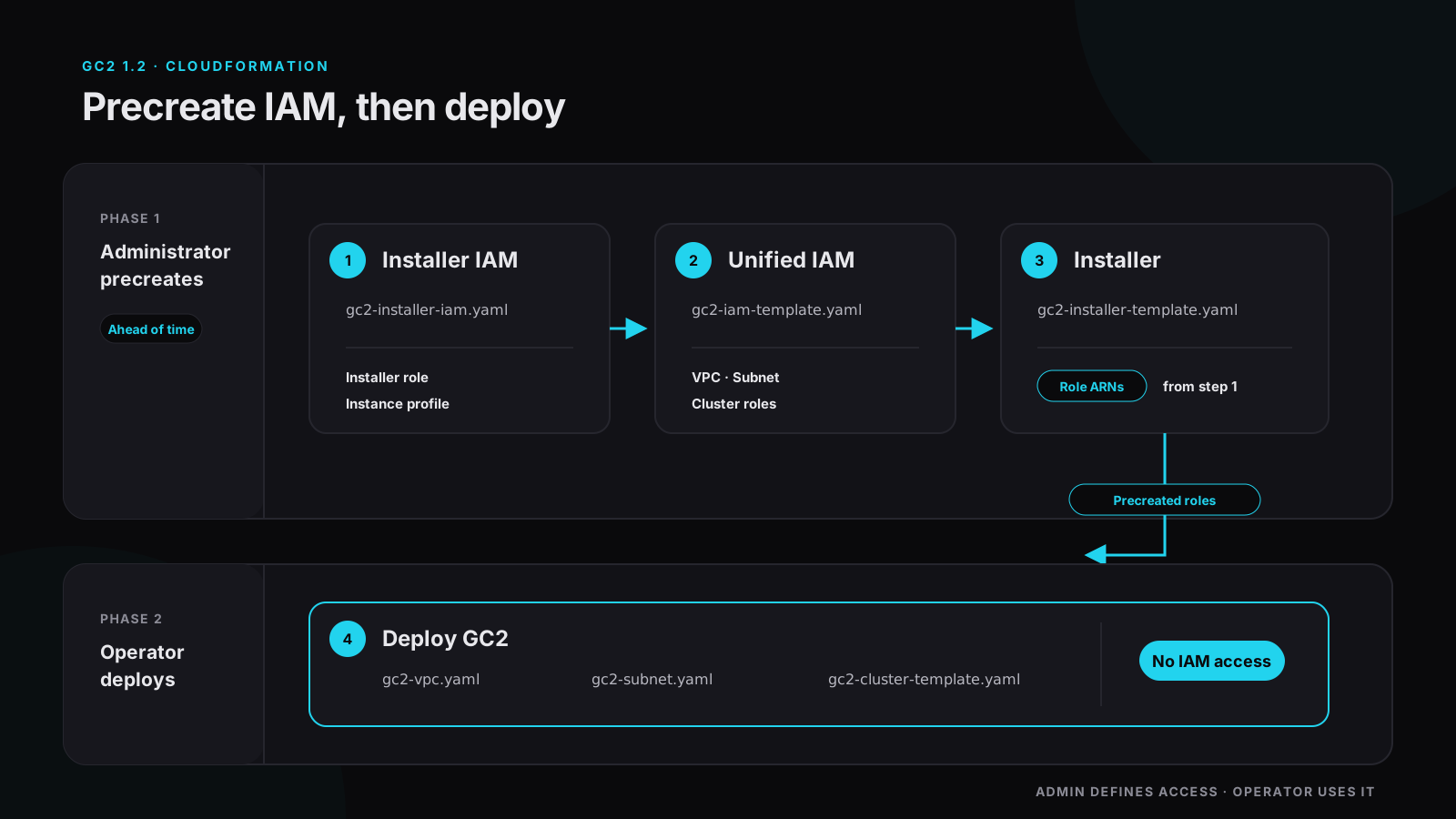
This is the deployment order for standing up Nutanix Government Cloud Clusters (GC2) in an account where the operator running the deployment isn’t permitted to create, pass, or assume IAM roles. An administrator stages every role first, in two dedicated CloudFormation stacks, and the operator then deploys against roles that already exist. For the reasoning behind splitting the job that way, read the companion piece, GC2 1.2’s New IAM Improvements: Old Way vs. New Way.
The optional IAM templates below don’t exist in earlier releases.
Step 1: Precreate the installer role
Deploy gc2-installer-iam.yaml. This stack creates the installer role and its instance profile, and it produces two outputs you’ll need later:
- The installer instance profile ARN
- The installer autodelete Lambda role ARN
Record both. Step 3 consumes them as parameters, and there’s no way to recover them later except reading them back off the stack, so capture them at creation time.
Step 2: Precreate the VPC, subnet, and cluster roles
Deploy gc2-iam-template.yaml, the unified IAM template. It covers the VPC role, the subnet role, and the cluster roles, and the selection is per resource: if you’re only adding clusters to a VPC and subnet that already exist, precreate the cluster roles alone and skip the rest.
The tag-discovery option in step 4 resolves against the roles this stack creates. That dependency is the reason step 2 has to complete before step 4 runs, and it’s the reason this template is the one to use if you’d rather not hand ARNs around between teams.
Step 3: Deploy the installer
Run gc2-installer-template.yaml and pass both ARNs from step 1 into their corresponding parameters. Populated, those parameters tell the template to use the installer instance profile and autodelete Lambda role that already exist. Left blank, the same template creates both of them inline.
Check those two parameter values before you submit the stack. A blank field doesn’t throw an error, it reverts to inline creation, and it does so successfully. In an account where the IAM control exists specifically to prevent that, a silent fallback is worse than a failure, because nothing tells you it happened.
Step 4: Run the VPC, subnet, or cluster CFT
Last step. Deploy gc2-vpc.yaml, gc2-subnet.yaml, and gc2-cluster-template.yaml, or whichever subset your build needs. Each one takes an IAM parameter with three accepted forms:
- Blank: the template creates the role inline. This is the default and it stays backward compatible with earlier releases.
- Tag discovery: the template locates and uses the role that
gc2-iam-template.yamlprecreated in step 2. - Explicit role ARN: the template uses one specific existing role.
For this sequence, set it to tag discovery, or to the explicit ARN of the role from step 2. Tag discovery means less to carry between stacks and fewer values to get wrong by hand. An explicit ARN pins the binding at submit time instead of resolving it at deploy time, which is easier to audit afterward.
When step 4 finishes, the operator has deployed a working GC2 environment without creating, passing, or assuming an IAM role at any point in the run. Every role the deployment needed was already there, staged by the administrator in steps 1 and 2.
Double Check
If your account allows inline role creation, ignore all four steps, leave every IAM parameter blank, and deploy the way you always have.
For everyone else, the order is the whole procedure. Steps 1 and 2 are administrator work and can run days or weeks ahead of the deployment itself. Step 3 can’t run correctly until step 1 has produced its outputs. Step 4 can’t discover a role that step 2 hasn’t created yet. Both dependencies fail the same quiet way, so validate that the precreate stacks are complete before the operator submits anything.