Count the hours your inference GPUs spend doing something useful. If your users are staff and customers in one or two time zones, the busy window looks like 10 hours a day, five days a week. That’s 50 hours. A week has 168. For the other 118 the hardware is powered on, depreciating and sitting in a rack (or on a cloud bill) waiting for Monday.
That idle time is the biggest drag on AI infrastructure ROI I see, and it almost never shows up in the business case. Nobody sizes a real-time endpoint for average load. You size it for 10 a.m. on a Tuesday, when every agent and analyst hits the AI assistant at once, because a chatbot that takes 40 seconds to answer is a chatbot nobody uses. Size for the peak and you’ve guaranteed yourself a lot of quiet capacity the rest of the week.
The fix is older than most of the people reading this. Mainframe shops ran interactive work during the day and batch work at night for decades. What’s new is that Nutanix Enterprise AI (NAI) 2.8 gives you the pieces to do the same thing with GPUs and LLMs.
What batch inference in NAI 2.8 gives you
Batch inference is new in 2.8. You hand NAI a JSONL file of OpenAI-style requests sitting on an NFS share. It works through the file and writes the results back to NFS. Nobody is waiting on any single answer. All you care about is that the whole file is done by morning.
A few rules shape how you use it. A batch job runs on a dedicated endpoint created with Purpose: Batch. Real-time endpoints can’t run batch jobs and batch endpoints can’t serve real-time traffic, so you’re running two kinds of endpoint. Batch endpoints take Text-to-Text and Embedding work, on GPU passthrough, NVIDIA MIG, vGPU or CPU (Intel AMX on 4th-gen Xeon or newer). Each data source tops out at 200 MB and 50,000 lines. The model field in every request has to match the batch endpoint’s name exactly, which is the first thing to check when a clean-looking file produces nothing. Jobs get a 24-hour completion window, and that’s the only window on offer.
The whole flow is in the NAI 2.8 REST API. Create the batch endpoint, register the input file as a data source, submit to /batches, then poll until the status moves through validating and in_progress to completed (or failed, expired or cancelled). Nobody should be clicking through a console at 7 p.m., and with the API nobody has to.
Start with the contact center
Take the contact center at a bank or an insurer. During the day, agents use a RAG assistant that pulls policy and product answers while the customer is still on the line. That’s real-time inference, sized for the morning rush.
Say the center handles 10,000 calls a day. Every one of them ends up as a transcript, and most of those transcripts are never read by anyone. QA teams sample a small fraction by hand and hope it’s representative. Compliance tends to find the problem call when the customer complains about it.
Now run the night shift. A Text-to-Text batch job takes the day’s transcripts and, for every call, writes a summary, tags the reason for contact, scores sentiment and complaint risk and flags anything that needs a compliance review. QA starts the morning with every call covered and a short list of the ones worth a human’s time. Depending on transcript length, a day of calls can run past the 200 MB limit, so it goes in as several shards rather than one file.
A second job runs on an Embedding batch endpoint. The policy and product documents that changed during the day get re-embedded overnight, so when agents log in, the assistant is answering from today’s policies.
There’s a good reason to do this on your own hardware instead of shipping it to a public cloud batch API. Those transcripts are full of account numbers, home addresses and the occasional health detail. Keeping that data on infrastructure you control makes for a much shorter meeting with your risk team.
Same shape, different industries
Once you start looking, the pattern shows up everywhere: a daytime app that needs fast answers, and a pile of documents that only needs answers by morning.
In healthcare, clinicians use an assistant during clinic hours. Overnight, the day’s clinical notes get summarized and coding suggestions get drafted for the coders to review when they come in.
In legal, the night shift does first-pass contract review and discovery triage. Load a few thousand documents in the evening and the associates start with a ranked pile instead of a raw one.
In retail, it’s product descriptions and attributes across the catalog. A new season of, say, 20,000 SKUs becomes a batch job instead of a copywriting sprint.
In IT operations, the day’s tickets and logs get classified overnight, and the morning standup opens with trends instead of a queue.
Day shift, night shift
NAI 2.8 doesn’t document a scheduler that trades GPUs between real-time and batch work. There’s no priority, no preemption and no autoscaling (instance count is set when you create the endpoint). What you do get is hibernate and resume. Hibernate releases an endpoint’s compute and keeps its configuration. Resume brings it back. Both are a single call to the endpoint state API, documented in the NAI 2.8 API reference on nutanix.dev. Wrap a handful of those calls in a script, run it as a Kubernetes CronJob, and you have a night shift.
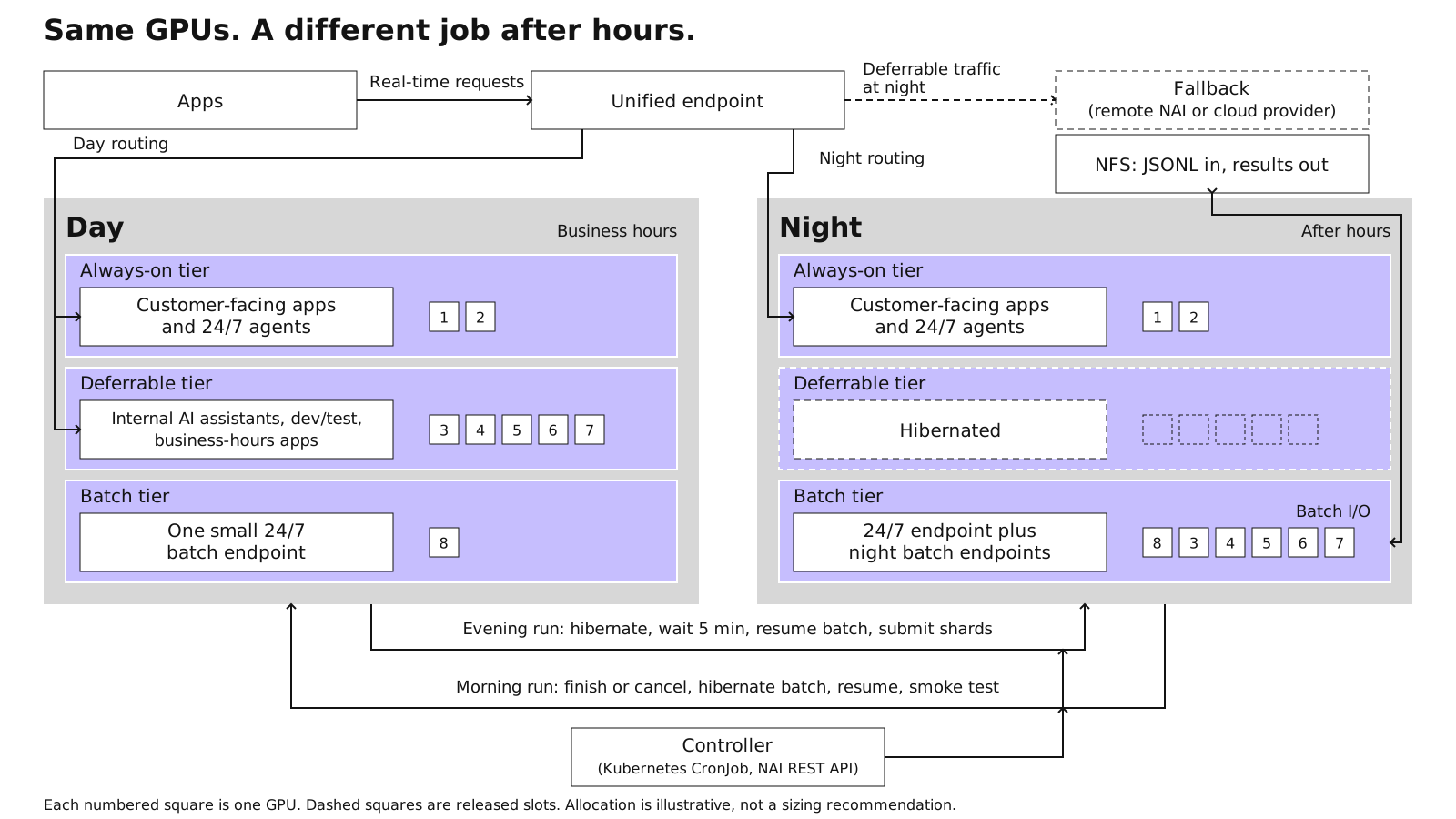
Before you write the script, sort your endpoints into three tiers.
The always-on tier is customer-facing apps and agents that run 24/7. The script never touches these.
The deferrable tier is real-time work that can be switched off overnight without anyone noticing, because nobody uses it after hours: internal AI assistants, dev/test, the apps that go quiet when the office does. These give up their GPUs at night.
The batch tier is one small batch endpoint that runs around the clock for whatever gets submitted during the day, plus larger batch endpoints that only wake up after hours.
The evening run goes like this:
- Check that the deferrable endpoints really are quiet.
- Drain them through the unified endpoint. Apps call one stable URL, and a unified endpoint can sit in front of other backends, including a remote NAI cluster or a cloud provider such as Bedrock or Azure OpenAI. The odd late-night user still gets an answer.
- Hibernate the deferrable endpoints.
- Wait five minutes. On a cluster with no spare capacity, Kubernetes needs that long to fully release the hibernated endpoints’ resources.
- Resume the night batch endpoints.
- Submit the queued shards.
The morning run reverses it:
- Let jobs finish, or cancel whatever is still running at a hard cutoff.
- Hibernate the night batch endpoints.
- Resume the deferrable tier.
- Run a smoke test against each one with a real request.
- Switch routing back.
Three safety rails keep this from paging someone. Give the script an explicit list of endpoints it’s allowed to touch, so a typo can’t hibernate the customer-facing bot at 7 p.m. Alert when a resume sits in Pending, because Pending means there’s no capacity, and you want to find that out at 6 a.m., not 8:55. And leave the fallback routing in place until the morning resume is confirmed.
Plan for cold starts. Resuming an endpoint means loading the model again, so kick off the morning swap early. Keep shards small enough that each one finishes well inside the window. If the cutoff has to cancel something, you lose one shard and rerun it the next night.
If you run NAI in the cloud on EKS or NC2, there’s another way to do it: add a GPU node pool at night and run batch there, leaving the real-time tier alone. You pay by the hour for that capacity, which can be the right trade when nothing in the daytime tier is safe to hibernate.
The cheapest GPU you’ll ever get
Most AI capacity conversations jump straight to buying more GPUs or renting them by the hour. Start with the hours you already own. Filling the 118 quiet hours a week puts no new hardware on the budget, and every one of them drops your cost per useful GPU hour. In return the business gets every call reviewed, an assistant that’s current each morning and a catalog that writes itself overnight.
The GPU you already paid for is the cheapest GPU you’ll ever get.
More reading: The Night Shift, by Jason Langone