A while back I showed how Nutanix MST on AWS could cut disaster-recovery cost by up to 65% by restoring from S3 instead of running a standby cluster you mostly never use (read it here). Azure has the same DR model, and the same MST engine behind it. But the money on Azure moves to a different place, and so does the mistake most people make.
This time the story is about where your replication and restore traffic actually goes. You can do everything right with Multicloud Snapshot Technology: protect your workloads, push snapshots to Blob, set up Zero Compute so you pay nothing for DR compute until the day you fail over, and still quietly pay full freight because the data is crossing the public internet the whole time.
The fix is the same whether you run Zero Compute or Pilot Light. Get MST’s storage account and its connectivity private before you ever need them. Zero Compute’s bill is a one-time restore. Pilot Light’s is a NAT charge that never stops.
I have now run both directions of that path against a live NC2 Azure MST deployment. Replication kept going after public access on the storage account was turned off. A VM restored from the Blob bucket back on-prem. The private path holds on-prem to Azure, and Azure back to on-prem.
Zero Compute, in one line
No DR cluster runs ahead of a disaster. MST replicates your snapshots to an Azure Blob storage account, and that is the entire DR footprint sitting idle. When something breaks, you spin up an NC2 cluster on demand and hydrate the workloads back from Blob. You pay for cloud compute only during an actual recovery.
That makes the restore (the moment you pull everything back out of Blob) the single biggest data movement in the whole model. Which is exactly where keeping the path private pays off.
Pilot Light, in one line
A minimal NC2 cluster runs continuously at the DR site with MST and Prism Central deployed. Snapshots replicate to Blob around the clock. When you fail over, you expand that pilot cluster to carry production. Critical workloads can replicate straight to the cluster at NearSync RPO. Everything else rides MST to Blob at the 1-hour RPO. Recovery plans are supported, so the failover runs as an orchestrated sequence instead of a manual scramble.
You pay for that cluster every hour of every day, whether or not you ever fail over. Standing cost in exchange for a recovery you can actually orchestrate. You can always add more nodes during the restore process.
Move 1: Turn off public access on the MST storage account
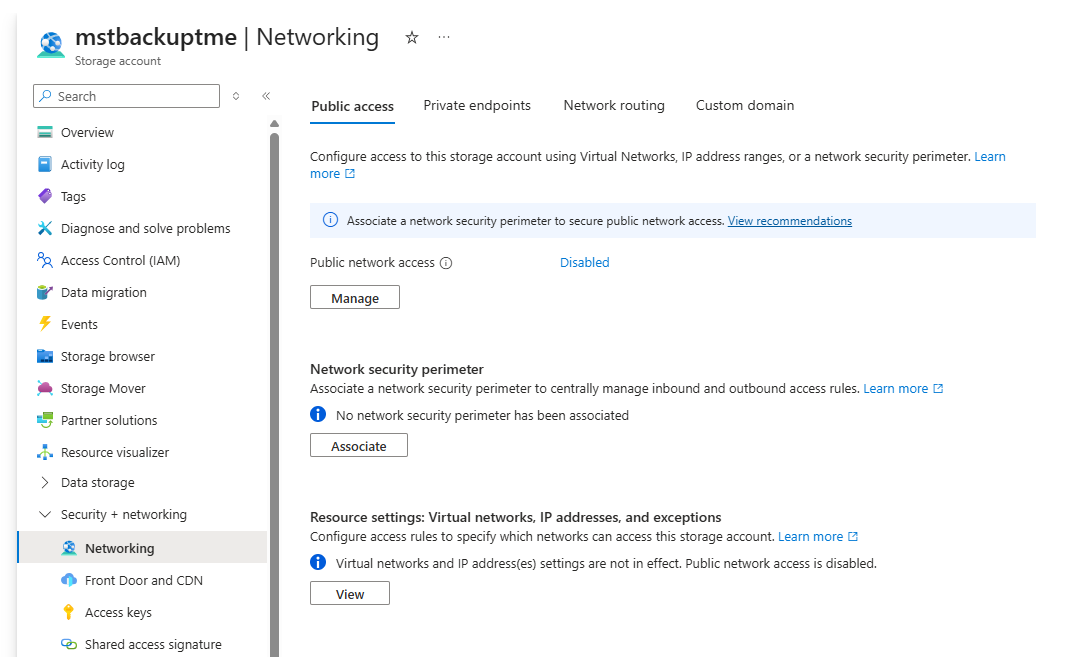
First, turn off public access on the MST storage account. This is the dedicated account you created for MST snapshots, which MST requires for its exclusive use. It is not the storage account NC2 provisions for Flow Gateway images, so locking it down does not touch your cluster networking.
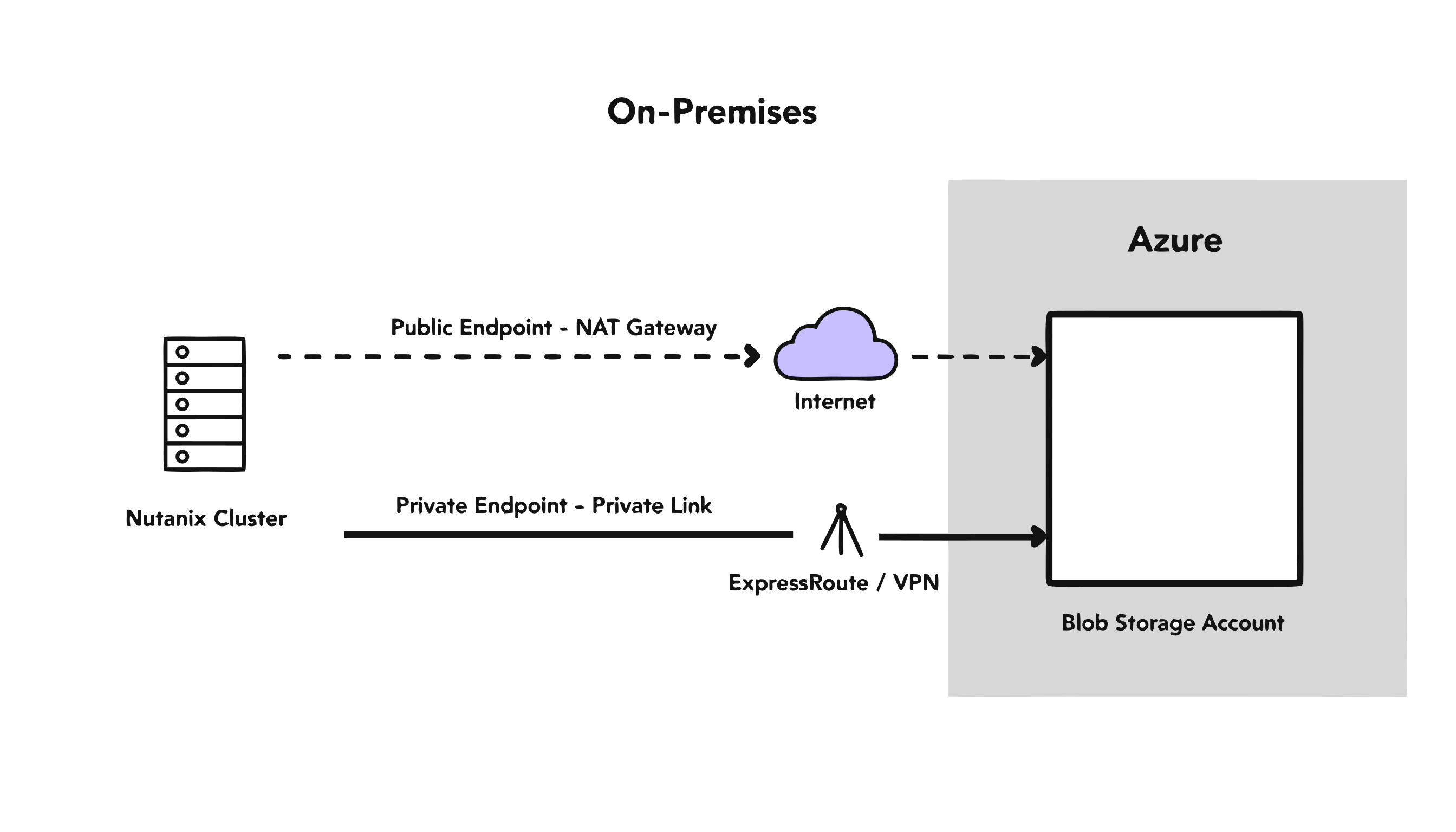
By default, on-prem MST replicates to Blob over the public internet. That traffic leaves through your on-prem NAT or firewall, and the standard guidance is to whitelist your on-prem public NAT/firewall IPs in the Azure storage account firewall. That is the right control for the default setup. The moment you front Blob with a Private Endpoint it stops mattering, because a Private Endpoint bypasses the storage firewall entirely. All the whitelist guards at that point is a public door your traffic no longer uses. So close the door. Disable public access and the account is reachable only over the circuit.
One caveat from experience: verify the Private Endpoint and DNS resolve end to end before you flip public access off, or you’ll lock yourself out of your own storage.
On the live NC2-on-Azure MST deployment, I disabled public network access on that storage account after the Private Endpoint and DNS were in place. Replication kept working.
Move 2: Fix DNS, because this is the step everyone forgets
Fix DNS, because this is the step that quietly undoes everything else.
The name myaccount.blob.core.windows.net is a CNAME to a privatelink name, and the record pointing at your Private Endpoint’s IP lives in an Azure Private DNS zone that on-prem has never heard of. Leave it alone and on-prem resolves the public IP, sends the traffic over the internet, and you pay full freight while believing you’re private.
The fix is an Azure Private DNS Resolver inbound endpoint plus a conditional forwarder on your on-prem DNS, so on-prem resolves the private IP and the data follows the circuit. Build the Private Endpoint and the circuit, skip the DNS, and you’ve built an expensive decoration.
The step-by-step for both moves is in the setup guide.
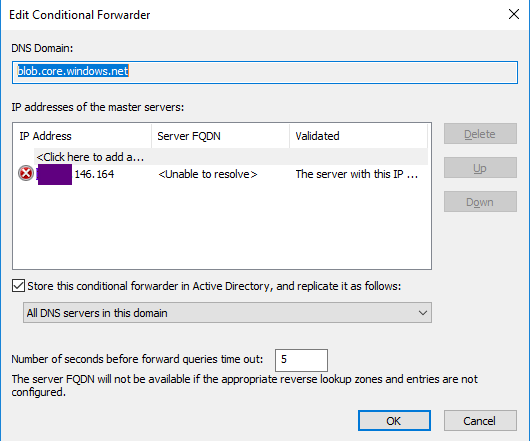
This error shown is false positive —– it stole hours of my time thinking the firewall was misconfigured.
Zero Compute: the restore is the bill
Here is why the setup matters for Zero Compute. Picture a 50 TB recovery: you’ve lost the primary site and you’re hydrating everything back from Blob into a freshly spun-up NC2 cluster.
If that read goes over the public endpoint, the cluster’s traffic leaves its subnet through an Azure NAT Gateway (by default it does) and NAT bills you for every gigabyte it processes. Front Blob with a Private Endpoint instead and the traffic never touches NAT. It rides Private Link at a fraction of the per-GB rate.
| Restore path (50 TB / 51,200 GB) | Rate | Data-transfer cost |
|---|---|---|
| Public endpoint, via NAT Gateway | $0.045 / GB | $2,304 |
| Private Endpoint, via Private Link | $0.010 / GB | $512 |
| Savings per restore | $1,792 (~78%) |
Azure list pricing, same-region restore, snapshot data only. Hourly charges (NAT Gateway and Private Endpoint at roughly $0.045/hr and $0.01/hr) are rounding error against the per-GB cost at this volume.
Roughly 78% off the data-transfer bill for a single recovery, and it lands at the worst possible time to be surprised by a cloud invoice: mid-disaster.
And that is on top of the compute story. A standby DR cluster (even a minimal one) bills 24/7 whether or not you ever fail over. Zero Compute carries none of that. Until the day you need it, your only standing cost is Blob storage holding the snapshots. The networking work above just makes sure the one big bill you do eventually pay is the small one.
Failback is the other direction: restore a workload from the Blob bucket back on-prem. I ran that restore against the same live deployment. The VM came back over the private path. The DNS mechanics that keep that restore private are in the failback section of the setup guide.
Pilot Light: NAT, every month
A Pilot Light cluster is always on, so it’s always replicating. That steady stream of changed data has to leave the cluster’s subnet to reach Blob, and over the public endpoint it leaves through a NAT Gateway. NAT bills per gigabyte processed, forever. It never sleeps because the cluster never sleeps.
Front Blob with a Private Endpoint and that traffic stays on the VNet. No NAT. You pay Private Link’s far lower per-GB rate instead.
Take a workload that changes about 2 TB a day, roughly 60 TB of replicated data a month:
| Replication path (60 TB / 61,440 GB per month) | Rate | Monthly cost | Annual cost |
|---|---|---|---|
| Public endpoint, via NAT Gateway | $0.045 / GB | $2,765 | $33,178 |
| Private Endpoint, via Private Link | $0.010 / GB | $614 | $7,373 |
| Savings | $2,150 / mo | ~$25,800 / yr |
Azure list pricing, same-region replication, changed data only. Hourly NAT and Private Endpoint charges are negligible against the per-GB cost at this volume.
Same ~78% rate gap as the Zero Compute restore. The difference is cadence. In Zero Compute you dodge that bill once, at failover. In Pilot Light you’d otherwise pay it month after month, so the Private Endpoint is a line item you delete from every invoice for as long as the cluster runs.
So which model do you pick
Pilot Light costs more than Zero Compute. You’re paying for an always-on cluster that mostly waits. What you buy with it is a faster RTO and automated, repeatable failover: the things that matter when an actual outage is measured against an SLA.
If your recovery can tolerate a manual spin-up and a longer wait, Zero Compute is the cheaper, simpler answer. If you need failover to be fast and orchestrated, Pilot Light earns its keep, and the private path work above is what stops the always-on convenience from quietly bleeding you on NAT charges every month.
Either way the traffic stays private. You do not pay the networking tax once, and you do not pay it every month.