This is the deployment guide behind Cutting the Cord on Azure. It configures the Zero Compute MST DR model on Azure and forces all MST replication and restore traffic onto your private circuit (ExpressRoute or VPN) instead of the public internet.
Zero Compute means no DR cluster runs before a disaster. On-prem MST replicates snapshots to an Azure Blob storage account. On failover, you deploy an on-demand NC2 cluster in Azure and restore from Blob. Recovery is manual — Zero Compute does not support automated recovery plans with 7.3 but is with 7.6.
Versions and prerequisites
- AOS 7.3+ and Prism Central 7.3+ on-premises. MST deploys from the Prism Central Marketplace starting at 7.3.
- A working ExpressRoute or VPN between on-prem and the Azure region you will recover into.
- Rights to create in Azure: a VNet, a storage account, a Private Endpoint, a Private DNS zone, and an Azure Private DNS Resolver.
- Control of your on-prem DNS servers (to add a conditional forwarder).
Per the NC2 on Azure product guide, MST DR on Azure requires three things specifically: a separate VNet for MST, a secure storage account, and a Blob container.
Azure does not allow multiple delegated subnets in a single VNet, and the NC2 cluster and Prism Central already consume delegated subnets. MST needs its own VNet so its subnet can be provisioned without colliding with those delegations.
Part A — Azure resources
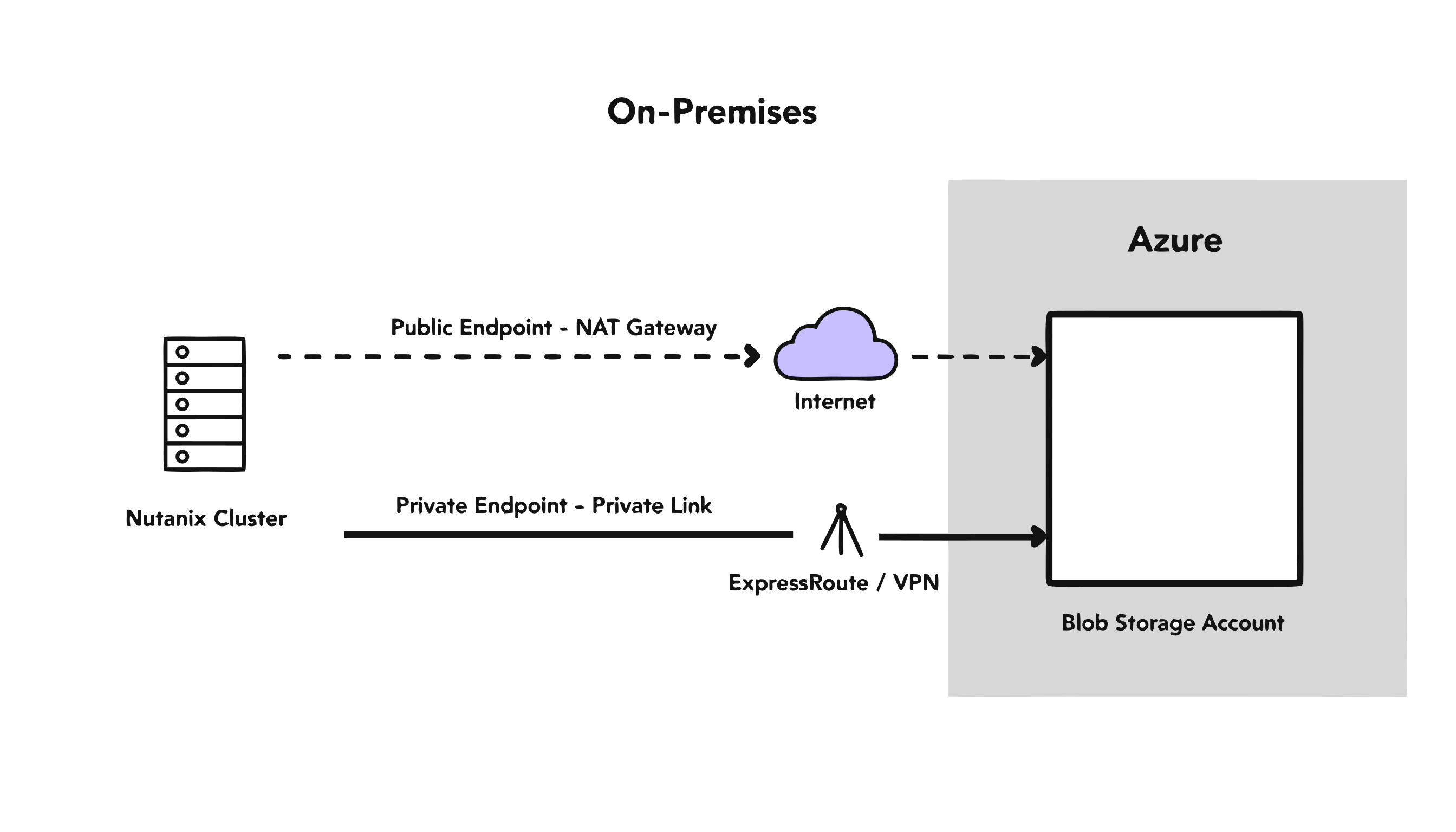
A1. Create the MST VNet and subnet
- Create a dedicated VNet for MST in the recovery region (do not reuse the cluster or Prism Central VNet).
- Add a subnet for the MST VMs. Reserve 3 static IPs outside the subnet’s DHCP range plus IPs for the MST VMs (standard Small tier deploys 4 VMs: 3 MSP controllers + 1 load balancer).
- Ensure the MST VNet has a route to on-prem over your ExpressRoute/VPN, and to the storage account’s Private Endpoint (next steps).
A2. Create the secure storage account and container
- Create a dedicated storage account for MST snapshots. Do not reuse the storage account NC2 provisions for Flow Gateway disk images — MST requires exclusive use of its account.
- Create the Blob container. The container/bucket name MST uses must carry the
nutanix-clustersprefix. - Leave public access on for now. You will disable it in Part D, only after private resolution is verified end to end. Turning it off first will lock you out.
A3. Create the Private Endpoint for Blob
- Create a Private Endpoint for the storage account, sub-resource
blob, attached to a peered hub VNet that both the MST VNet and on-prem can reach. Do not attach it to the MST VNet itself, see the note below. - This creates a NIC with a private IP and a DNS name of the form
myaccount.privatelink.blob.core.windows.net.
MST’s own subnet is delegated, to Microsoft.BareMetal/AzureHostedService, the same delegation used for the cluster management and Prism Central subnets. MST’s MSP VMs (load balancer, sMSP DNS, sMSP VIP) sit directly on that delegated subnet, the same as host, CVM, and Prism Central. They are not exempt UVM-overlay traffic.
The Azure product guide’s supported-topologies table blocks exactly the case where that matters: connectivity from BareMetal to a private endpoint in the same VNet on a delegated subnet is not supported. Connectivity to a private endpoint in a different, peered VNet is supported. That is why this guide puts the Private Endpoint in a separate hub VNet peered to the MST VNet, not inside the MST VNet. That topology is tested and works. Attaching the Private Endpoint directly to the MST VNet has not been tested here and, per the documented restriction, is not expected to work.
A4. Create the Private DNS zone for Blob
- Create an Azure Private DNS zone named exactly
privatelink.blob.core.windows.net. - Link it to the MST VNet.
- Add a second Virtual Network Link to every other VNet that must resolve the private IP, typically the hub or management VNet that hosts the Azure Private DNS Resolver inbound endpoint. In a hub-spoke layout this second link is commonly required and easy to skip. The MST VNet link does not cover it.
- When you created the Private Endpoint in A3, let Azure register its A record in this zone automatically. Confirm the zone now has an A record mapping
myaccount→ the Private Endpoint’s private IP.
At this point Azure-side resources resolve the storage account to its private IP. On-prem still does not — that is Part C.
Part B — Deploy MST from the Prism Central Marketplace
- In on-prem Prism Central: Admin Center > Marketplace > Multicloud Snapshot Technology. Deploy it. (Helm-based deployment handles install and upgrades from 7.3 onward.)
- During deployment, provide the 3 static IPs reserved in A1 and the MST subnet.
- Configure the object store target: the storage account from A2, the
nutanix-clusters-prefixed container, and the recovery region. - Create a protection policy for the VMs and Volume Groups you want protected. Async only, 1-hour RPO minimum.
- Confirm snapshots begin replicating to Blob on schedule.
MST allows only one instance per Prism Central, and it must have exclusive access to its bucket.
Part C — Configure DNS so on-prem resolves the private IP
This is the step that quietly undoes everything if you skip it. Without it, on-prem resolves the public IP of the storage account, sends replication over the internet, and you pay full freight while believing you are private.
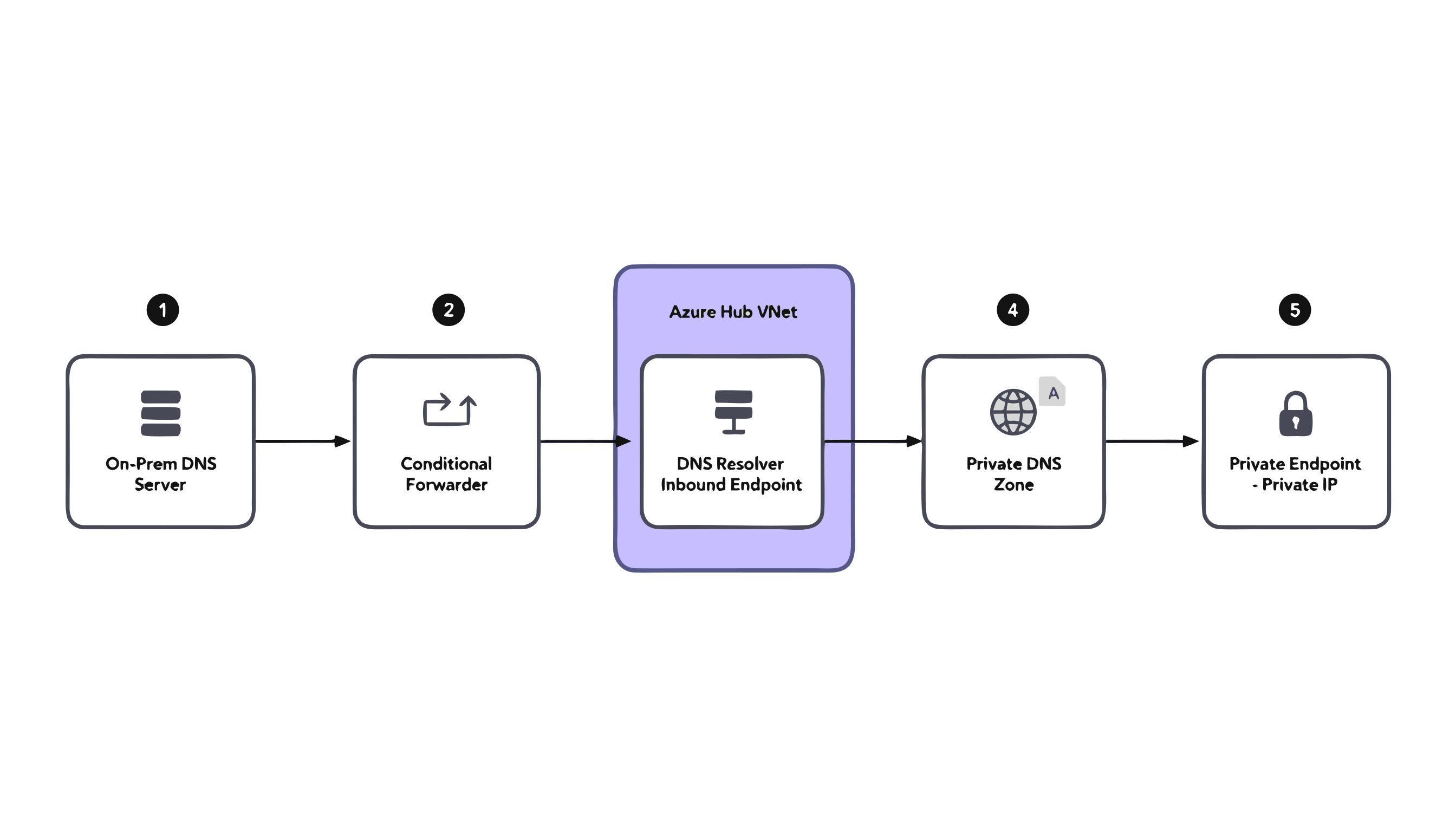
C1. Understand the resolution chain
myaccount.blob.core.windows.net is a CNAME to myaccount.privatelink.blob.core.windows.net. The A record that maps the privatelink name to the Private Endpoint’s private IP lives in the Azure Private DNS zone from A4, a zone your on-prem DNS has never heard of. So on-prem needs a way to query Azure’s private DNS.
C2. Deploy an Azure Private DNS Resolver (inbound endpoint)
- Create an Azure Private DNS Resolver in a VNet that is reachable from on-prem over ExpressRoute/VPN (commonly a hub VNet).
- Add an inbound endpoint. It requires its own subnet delegated to
Microsoft.Network/dnsResolvers, minimum /28, with no other resources in it. - Note the inbound endpoint’s private IP, the address on-prem will forward to.
- Ensure the
privatelink.blob.core.windows.netprivate DNS zone (A4) is linked to the resolver’s VNet, so the resolver can answer queries with the private IP. If the resolver lives in a different VNet than the MST/storage VNet, the zone needs two separate Virtual Network Links, one to each VNet. Peer the hub/resolver VNet with the MST VNet if they differ; peering is not a substitute for the second link and does not extend private DNS zone visibility. Ifnslookup <name>.privatelink.blob.core.windows.net <resolver-inbound-IP>returns NXDOMAIN even though the record exists in the zone’s Recordsets, check whether the zone has a Virtual Network Link to the resolver’s own VNet specifically (Portal: the zone → Virtual Network Links), not just the storage-side VNet.
The two endpoint types do opposite things. The inbound endpoint lets queries come into Azure from on-prem, this is what the replication leg uses, and it’s the only endpoint this guide requires. The outbound endpoint (plus a DNS forwarding ruleset) lets Azure VNet resources resolve names that live elsewhere, which is not needed for reaching Blob in either direction. For the restore itself you do not need an outbound endpoint: the on-demand NC2 cluster and MST VMs are in Azure reading Blob, and they resolve the Private Endpoint’s private IP automatically as long as the recovery VNet is linked to the private DNS zone and uses Azure-provided DNS (168.63.129.16). You only need an outbound endpoint if your Azure recovery VNet uses a custom/centralized DNS server, or if recovered workloads must resolve on-prem names from Azure.
C3. Add the conditional forwarder on on-prem DNS
On your on-prem DNS servers, add a conditional forwarder:
- Domain:
blob.core.windows.net - Forward to: the Private DNS Resolver inbound endpoint IP from C2
Ports: allow UDP/53 and TCP/53 outbound from your on-prem DNS servers to the inbound endpoint IP (TCP is the truncated-response fallback, not optional). Open the same UDP/53 + TCP/53 inbound on the NSG of the resolver’s inbound-endpoint subnet, scoped to your on-prem DNS server source IPs, and make sure the inbound endpoint IP is routable from on-prem over ExpressRoute/VPN.
Forward blob.core.windows.net, not the whole core.windows.net. A broad forwarder can pull unrelated Azure service lookups into your private resolver and cause surprises.
C4. Verify resolution end to end (before locking anything)
Before you run nslookup, copy the exact FQDN from the storage account’s private endpoint DNS configuration blade (Customer Visible FQDNs). A single mistyped character in the hostname produces the same NXDOMAIN as a missing zone link, a missing record, or a broken forwarder, and sends troubleshooting down the wrong path.
From an on-prem host:
nslookup myaccount.blob.core.windows.net
# Expect: a CNAME to myaccount.privatelink.blob.core.windows.net
#         resolving to the Private Endpoint's PRIVATE IP (RFC1918),
#         NOT a public Azure IP.
If you still get a public IP, stop. Re-check the conditional forwarder target, the DNS zone VNet link, and VNet peering. Do not proceed to Part D until on-prem resolves the private IP.
Part D — Lock down public access and confirm private path
- Only after C4 passes: on the MST storage account, disable public network access (Networking > Public network access > Disabled). The account is now reachable only through the Private Endpoint over your circuit. Default guidance whitelists your on-prem NAT/firewall public IPs in the storage firewall; with a Private Endpoint that whitelist guards a door nobody uses, so disabling public access is cleaner.
- Confirm MST replication still succeeds after lockdown (check the protection policy / replication status in Prism Central).
- Confirm the replication path is private: traffic to the storage account should traverse ExpressRoute/VPN, not your internet egress.
I ran this against a live NC2 on Azure deployment: disabled public network access on the storage account after Private Endpoint and DNS were confirmed, and replication kept working without interruption.
Failover (manual restore — Zero Compute)
Zero Compute has no automated recovery plan. The failover is manual:
- Deploy an on-demand NC2 cluster in the recovery region (and a Prism Central if one is not already available to manage it).
- Point recovery at the MST object store and restore the VMs and VGs from Blob.
- The on-demand cluster reads snapshot data from Blob. By default that read leaves the cluster subnet through an Azure NAT Gateway; with the Private Endpoint in place it rides Private Link instead, which is where the restore-cost savings come from.
- (PC 7.5.1+) Instant Recovery lets restored entities come online before full hydration completes, data is fetched on demand from Blob while hydration runs in the background, reducing RTO.
Failback — returning to on-prem
Failback has two DNS-relevant legs, and both map onto components you already built:
- Interim replication, Azure → Blob. While workloads run on the on-demand Azure cluster after failover, ongoing changes still write to the same MST object store. This is Azure resolving
blob.core.windows.net, the identical intra-Azure resolution C2 covers for restore reads. - Final restore, on-prem ← Blob. Once the on-prem cluster is rebuilt or available again, it restores the latest snapshot from Blob. This is on-prem resolving
blob.core.windows.net, the same direction as the original replication leg in Part C, so it rides the existing inbound endpoint and conditional forwarder.
Don’t tear down Part C after failover. If the inbound endpoint, conditional forwarder, or private DNS zone link get decommissioned once the on-demand cluster is up, failback loses private resolution on rebuild and silently falls back to the public IP, the same failure mode C1 warns about for the initial replication leg. Keep them alive for the whole DR lifecycle.
I tested this restore direction too: a VM restored from the Blob bucket back to on-prem over the same private path, on the same live deployment.
Failback checklist:
- Part C’s inbound endpoint, conditional forwarder, and private DNS zone link confirmed still active during the Azure interim period
- On-prem
nslookup myaccount.blob.core.windows.netre-verified before final restore (repeat C4)
Quick checklist
- AOS 7.3+ / PC 7.3+, ExpressRoute or VPN up
- Dedicated MST VNet + subnet, 3 static IPs reserved outside DHCP
- Dedicated secure storage account +
nutanix-clusters-prefixed container (public access still ON) - Private Endpoint (blob sub-resource) created
privatelink.blob.core.windows.netPrivate DNS zone created and VNet-linked, A record present- MST deployed from PC Marketplace, object store + protection policy configured, replication running
- Private DNS Resolver inbound endpoint (subnet delegated to
Microsoft.Network/dnsResolvers, /28) - On-prem conditional forwarder for
blob.core.windows.net→ resolver inbound IP nslookupfrom on-prem returns the PRIVATE IP- Public network access disabled on the storage account, replication re-verified
CIDR sizes, port lists, and Marketplace menu paths are from the NC2 on Azure product guide as of June 2026. Verify against current Nutanix and Microsoft docs for your AOS/PC version before deploying.